react-scan vs why-did-you-render vs Genie: which one can your AI agent actually read?
One React bug, three tools. react-scan logged 29 component names with no cause. why-did-you-render logged nothing until one option changed. Genie named the prop on the CLI and failed the run with exit 1.
Your agent can read all three, but it gets very different answers. On the same bug, react-scan gave
it 29 console lines that say OrderRow and nothing else. why-did-you-render gave it nothing until
logOnDifferentValues was on, then traced the bad prop to a useCallback dependency. Genie printed
the prop on the command line and returned a fail verdict with exit code 1.
Every command and output below comes from runs on the Meridian Ops dashboard in this repo
(apps/realworld-dashboard). The Genie steps were re-run on Genie 1.1.0, and the Genie output comes
from that re-run. The full logs are in the
evidence file.
One order goes on hold and every row re-renders
The orders table renders each row as a memoized OrderRow. Putting one order on hold should
re-render one row. It re-renders all of them, because the row callback depends on the whole order
list:
const onStatusChange = useCallback(
  (id: string, status: OrderSummary['status']) => {
    const order = rows.find((row) => row.id === id)
    if (order) changeStatus({ id, number: order.number, status })
  },
  [rows, changeStatus],
)
Each run drove the same interaction with agent-browser. It opened the Actions menu on SO-105979,
clicked Put on hold, and waited for the SO-105979 updated toast. react-scan and
why-did-you-render ran in scratch copies of the app, installed the way their READMEs describe, with
Genie still in place. The agent read their console output with agent-browser --session art-m1 console.
react-scan draws the answer on the page
react-scan's main output is an overlay. After the click, every row carried an OrderRow ×2 label:
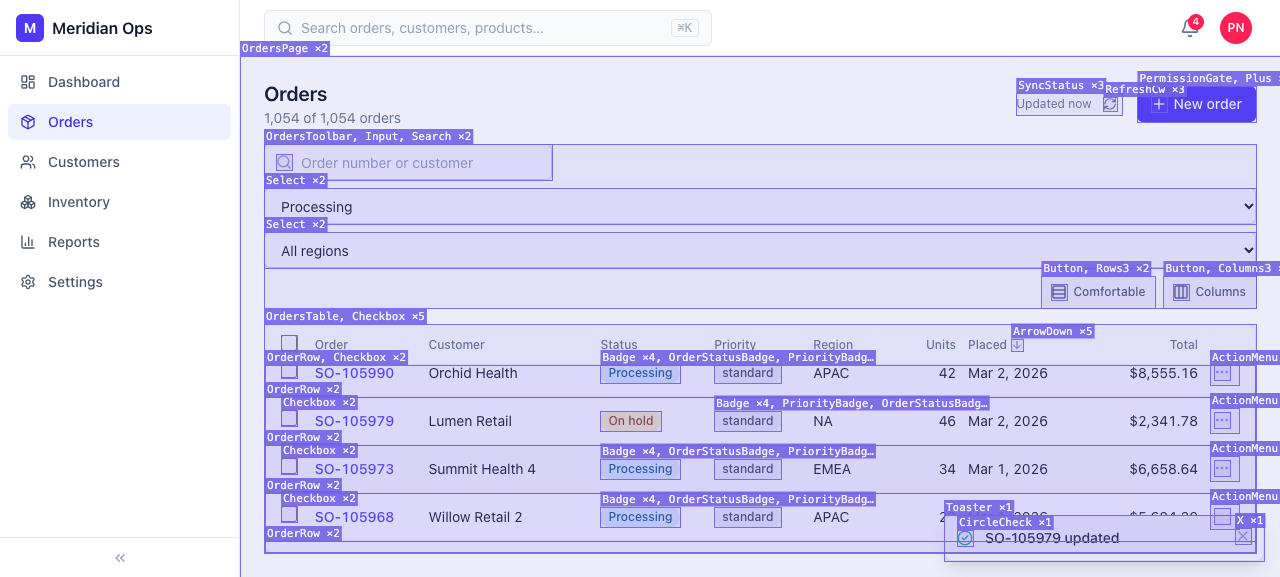
A person sees the problem at once. An agent sees it only if it takes a screenshot and reads the labels. The overlay also gets in the agent's way. With the default toolbar on, the toolbar sat over the Actions button of the last visible row, and agent-browser refused to click it:
✗ Element '@e1' is covered by <div#react-scan-root> at its click point, so the input would land on that element instead. Dismiss or interact with the covering element first (it is often a dialog, banner, or sticky header).I turned the toolbar off with scan({ enabled: true, log: true, showToolbar: false }). With
log: true, react-scan writes one console group per rendered component. The console held 29
OrderRow groups for the interaction, and each was empty (one shown):
[startGroup] %cOrderRow (0.4ms) background: hsla(0,0%,70%,.3); border-radius:3px; padding: 0 2px;
[endGroup] console.groupEnd
The count matches Genie's 29 renders, but no line names a cause. react-scan 0.5.7 creates its instrumentation with
trackChanges: false, so the log has no changed props to print. Its source collects changed props
for the toolbar's inspector, which a person opens by selecting a component.
why-did-you-render writes the cause to the console, with one option
why-did-you-render ran with trackAllPureComponents: true, imported first in main.tsx, and the
Vite React plugin set to jsxImportSource: '@welldone-software/why-did-you-render'. In this setup it
logged no OrderRow entry at all. It logged two re-renders of a component it called Unknown, and
this line twice:
[log] whyDidYouRender error in getOwnerDifferences. Please file a bug at https://github.com/welldone-software/why-did-you-render/issues. {errorInfo: Object}By default why-did-you-render reports re-renders it thinks you could have avoided. Here rows really
changed, so the new callback did not qualify. After adding logOnDifferentValues: true, it logged 10
OrderRow groups. Each one walks from the prop into the parent's useCallback dependencies (trimmed
to two lines of one group):
[log] {OrderRow: } Re-rendered because of props changes:
[log] {prev onStatusChange:parent-hook-useCallback-deps[0]: Array(1054)} !== {next onStatusChange:parent-hook-useCallback-deps[0]: Array(1054)}
That is the deepest answer of the three. It names dependency [0] of the useCallback, the
1,054-row rows array. Genie stops at the prop. This run also wrote 1,001 console
lines for one click, and the agent has to find these lines among them.
Genie answers on the command line and returns a verdict
Genie runs beside the app and prints to the terminal. The agent opens a render window, runs the interaction, and waits until React, Query and Router are all settled before it reads:
npx genie-react call react_clear_renders '{"component":"OrderRow"}' --session upd-g
# Put SO-105979 on hold with agent-browser, using --session upd-g.
npx genie-react call devtools_wait '{"condition":"settled","domains":["react","query","router"],"timeoutMs":10000}' --fail-on-result-error --session upd-g
npx genie-react call react_render_causes '{"component":"OrderRow","limit":3}' --session upd-g
react_render_causes returned 29 events, each graded (trimmed to two):
  OrderRow #13713092378813 {renderEventId:render:17:241,mountId:mount:6,key:o-105915}
    ← props exact onStatusChange
  OrderRow #13713092378779 {renderEventId:render:17:240,mountId:mount:5,key:o-105917}
    ← props exact onStatusChange
exact means Genie saw the prop change directly. To check a fix, the agent writes claims first:
npx genie-react verify begin --session upd-g --name 'put one order on hold' \
  --claim 'render OrderRow only props.order,mount' --claim 'render OrderRow min 1' --claim 'boundaries clean'
The claim allows mount because three rows below the fold mounted during the interaction. Before the
fix, verify end failed with exit code 1 (trimmed to the verdict and first claim):
fail vfy_673952a4-e627-4f4c-b938-f894742abd3a "put one order on hold"  10 commits, quiet after 830 ms (react, query, router, network)
  1 fail render OrderRow only props.order,mount  {renders:29,events:29,violatingEvents:26,causes:[mount,props.onStatusChange,props.order]}
The fix, and what each tool showed after it
The fix from the answer key passes the whole order to the callback, so it no longer needs rows:
   const onStatusChange = useCallback(
-    (id: string, status: OrderSummary['status']) => {
-      const order = rows.find((row) => row.id === id)
-      if (order) changeStatus({ id, number: order.number, status })
-    },
-    [rows, changeStatus],
+    (order: OrderSummary, status: OrderSummary['status']) => changeStatus({ id: order.id, number: order.number, status }),
+    [changeStatus],
   )
OrderRow calls onStatusChange(order, 'on_hold') to match. With the fix applied, Genie passed
with exit code 0:
pass vfy_dd4ac4d4-d0e2-4ab7-aa00-2dbaf890c7fa "put one order on hold"  10 commits, quiet after 2015 ms (react, query, router, network)
  1 pass render OrderRow only props.order,mount  {renders:5,events:5,violatingEvents:0,causes:[mount,props.order]}
The other two agreed. react-scan's console dropped from 29 OrderRow groups to 5. why-did-you-render
dropped from 10 OrderRow groups to 2, and no line mentioned onStatusChange. Neither returns a
verdict, so the agent has to count lines and decide on its own.
Where each output goes
| react-scan | why-did-you-render | Genie | |
|---|---|---|---|
| Where it writes | Canvas overlay and toolbar on the page. Console with log: true | Browser console | CLI text, or JSON with --json |
| What the agent gets for this bug | 29 OrderRow names, no cause | Nothing by default. With logOnDifferentValues, the prop and the useCallback dependency | The prop on each render, graded exact |
| How the agent reads it | Screenshot, or agent-browser console | agent-browser console | npx genie-react call and verify |
| Fix check | Count console lines | Count console lines | verify exits 0 pass, 1 fail, 4 refused, 5 inconclusive |
| Install | Script tag or npx -y react-scan@latest init | npm package, wdyr file, JSX import source | genie-react init |
When to pick which
Use react-scan when a person is watching. The overlay found this bug in one click, with no reading at
all. Use why-did-you-render when you need to know why a callback or memoized value got a new
identity. It followed the chain into the parent's dependencies, which Genie did not. Use Genie when
an agent does the work and someone needs proof. It names the cause in the terminal, and verify
returns an exit code for the fix. The verify guide lists every claim form.
Genie does not fit everywhere. It needs a React development build and the genie-react package in
your app, and it cannot tell you what the screen looks like. For that, keep the driver, or keep
react-scan open beside you.
The best tools to let an AI agent debug your React app in 2026, run on one real bug
Six tools ran on one React bug where putting an order on hold re-rendered all 13 rows. Four named the prop an agent could act on. One returned a pass or fail verdict with an exit code.
Genie vs agent-react-devtools: one named the re-render, the other reported 291 first mounts
Both tools give your coding agent React DevTools data as text. On the same React 19 bug, Genie named the cause and proved the fix, and agent-react-devtools' profile went wrong.